Processing JSON with JSR 353 streaming APIs
Processing JSON with JSR 353 streaming APIs
This category of APIs supports the streaming model for both reading and writing the JSON content. This model is designed to process a large amount of data in a more efficient way. Conceptually, this model is similar to the Streaming API for XML (StAX) parser that you might have used while dealing with the XML data.
Streaming APIs are grouped in the javax.json.stream package in the JSR specification. In this section, we will see how we can use the streaming APIs to efficiently process JSON data.
Here is a list of the frequently used classes in the streaming API provided by the JSR 353 specification:
Class | Description |
javax.json.stream.JsonParser | This class provides forward read-only access to JSON data by using the pull parsing programming model. |
javax.json.stream.JsonGenerator | This class writes JSON to an output source as specified by the client application. It generates the name-value pairs for the JSON objects and values for the JSON arrays. |
Streaming APIs read and write the content serially at runtime in accordance with client calls, which makes them suitable for handling a large amount of data.
This example illustrates the use of streaming APIs for converting a JSON array of the employee objects present in the emp-array.json file into an appropriate Java class representation.
The following code snippet illustrates how you can use javax.json.stream.JsonParser, which follows the streaming parsing model, to read the content from the emp-array.json file:
Remember that JsonParser parses JSON by using the pull parsing programming model. In this case, the client application code controls the progress of parsing. The client calls next() on JsonParser to advance the parser to the next state after processing each element. In response to the next() call from the client, the parser generates the following events on the basis of the type of the next token encountered: START_OBJECT, END_OBJECT, START_ARRAY, END_ARRAY, KEY_NAME, VALUE_STRING, VALUE_NUMBER, VALUE_TRUE, VALUE_FALSE, and VALUE_NULL.
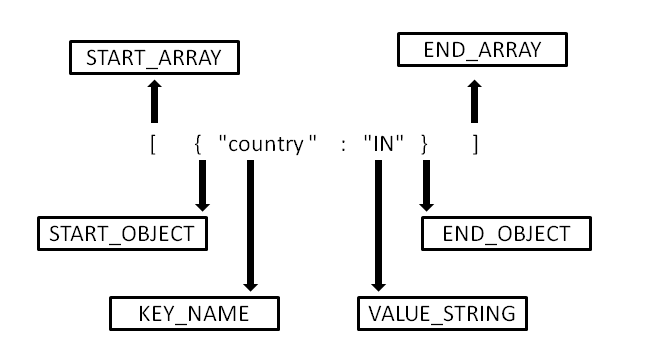
To better understand this, consider the following JSON array as the input to the parser:
The parser generates the START_ARRAY event for the first call to the next() method and the START_OBJECT event with the second call to the next() method, and so on. The following diagram illustrates the events generated while parsing each token present in the JSON representation:


Comments
Post a Comment